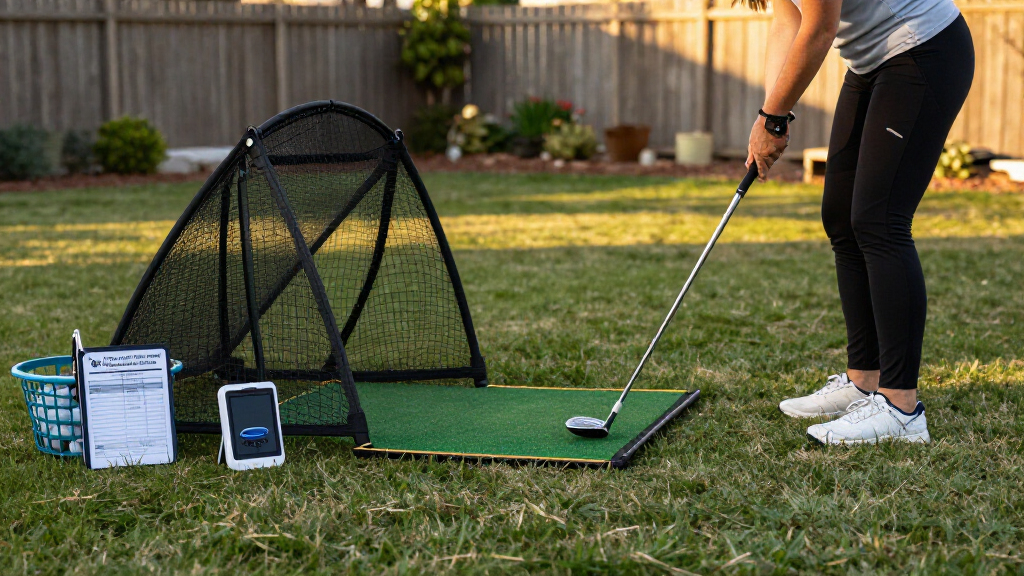
Use this checklist if you want to put together a home golf practice setup, whether you are starting with one item or planning several practice stations. It covers nets, mats, putting practice, ball retrieval, swing training, and launch monitoring so you can match each pick to the kind of practice you want to do. Choose for your space and routine.

Get sports gear delivered free with Prime
- Fast, free delivery on millions of items
- Prime Video, Amazon Music and more included
- Member-only deals all year
The sections follow those six product types. Each one explains why the slot matters, points out details to check before buying, and names the listed pick. Some product names are truncated, so confirm the full listing and included components before placing an order. Check the complete product details for dimensions and compatibility.
Start with the practice activity you will use most, then check where the item will go and what it needs to work with. Measure available floor or yard space, compare product dimensions, and review setup and storage requirements. Treat the picks as a checklist: fit, setup, and intended use should guide your choice.
Golf Practice Net
A net gives you a contained place to hit balls during home practice. Before choosing one, decide where it will stand and which shots you intend to hit into it. The listed pick is the Spornia SPG-7 Golf Practice Net with Automatic Ball Return and Target. Its name identifies ball return and a target, features to consider if you want a practice setup with those elements.
A common mistake is choosing a net based on its name alone without checking its assembled dimensions, setup instructions, and intended use. Measure the practice area, including clearance around the net and room for your stance and swing. Check whether the product is intended for indoor use, outdoor use, or both, and review what is included in the listing. Confirm the target and ball return are part of the exact configuration you are buying. Verify the full dimensions and setup requirements before deciding.
For an indoor setup, check ceiling height and surrounding clearance; outdoors, confirm the location has room for the assembled net. Consider how you will put the net away if it will not stay set up. Match the setup to your space and practice routine.
What to look for:
- Assembled width, height, and depth
- Indoor or outdoor use guidance
- Setup and takedown instructions
- Whether the target and ball return are included
- Storage dimensions and included components
Spornia SPG-7 Golf Practice Net with Automatic Ball Return and Target Sheet

The Spornia SPG-7 Golf Practice Net is designed for practicing full swings, chipping, and putting with real golf balls. It features an automatic ball return system, a large target area, and is suitable for indoor and outdoor use, offering quick setup and portability.
Pros:
- Automatic ball return system for convenience
- Large target area suitable for various practice types
- Portable and easy to set up indoors or outdoors
Cons:
- Requires real golf balls for practice
- Limited to small ball capacity for extended practice sessions
Best for: Golfers who want a net listing that names a target and automatic ball return.
Not ideal for: Buyers who cannot confirm the assembled dimensions or setup fit their practice area.
Bottom line: Check the full listing and measure your practice area before choosing the Spornia SPG-7.
Golf Hitting Mat
A hitting mat provides a defined surface for repeated swings, so its footprint and placement affect how comfortably it fits into a practice routine. The listed pick is the SIGPRO Softy Golf Mat, described in its name as a professional-grade indoor practice mat. Check the full product listing to understand its dimensions, construction, and intended setup.
A common buying mistake is treating the word “soft” or “professional-grade” as a substitute for checking the surface and requirements. Compare the mat’s length and width with the space available, and make sure you have enough clearance for your stance and full swing. Review the instructions for the surface where it can be placed and whether any additional components are required. Confirm the mat’s footprint and installation details rather than relying on the product title.
Think about how the mat will sit relative to your hitting direction and any other practice equipment. If you plan to pair it with a net or launch monitor, verify that the arrangement works in the same space and that each product’s instructions allow your intended setup. Check whether the mat can be moved or stored conveniently if you need to clear the area. Plan the whole practice station before settling on a size.
What to look for:
- Mat length and width
- Surface and placement requirements
- Indoor setup instructions
- Room for stance and full swing
- Storage or repositioning guidance
SIGPRO Softy Golf Mat – Professional-Grade Indoor Practice Mat with Realistic Fa

The SIGPRO Softy Golf Mat offers a realistic fairway feel with proprietary turf layered over flexible materials, providing authentic feedback for indoor golf practice. Its shock-absorbing design protects joints during extended use, and the replaceable hitting strip ensures durability for long-term training.
Pros:
- Realistic fairway feel for authentic practice
- Shock-absorbing cushioning protects joints
- Replaceable hitting strip extends mat lifespan
- Suitable for home golf simulators
Cons:
- Heavy for some setups (31 lbs)
- Requires space of at least 4′ x 10′
- Price not specified
Best for: Golfers planning a dedicated indoor hitting area.
Not ideal for: Buyers without enough room for the mat and a full swing.
Bottom line: Measure the practice area and verify placement requirements for the SIGPRO Softy Golf Mat.
Putting Green Mat
A putting mat gives your practice area a dedicated place for putting strokes. The listed pick is the Professional Synthetic Nylon Turf Artificial Grass Practice Putting Green. The name identifies synthetic nylon turf, but the full listing should provide the dimensions and configuration needed to judge how it will work at home.
A common mistake is buying a mat without checking how much room it takes up or how its layout fits your practice space. Compare its full length and width with the available floor area, and consider the space needed to stand and putt comfortably. Review how the product is laid out, what surfaces it can rest on, and whether the listing describes any setup or care requirements. Check the complete dimensions rather than judging fit from product photos or title alone.
If you plan to leave the mat in place, consider whether its footprint works with the room’s regular use. If you will move it between sessions, check how it is rolled, stored, or repositioned according to the listing. Also compare its setup with other items in your home practice arrangement so the putting area does not interfere with a hitting station. Choose a layout you can use consistently in the space you have.
What to look for:
- Full mat length and width
- Putting layout and configuration
- Suitable placement surfaces
- Setup and care instructions
- Rolling, storage, or repositioning details
Professional Synthetic Nylon Turf Artificial Grass Practice Putting Green 12×15

This 12×15-foot synthetic putting green is made of durable nylon with urethane backing, providing a realistic roll of 11-12 on the stimpmeter. Suitable for indoor or outdoor use, it includes three pre-cut holes for practice.
Pros:
- Durable nylon construction with long-lasting urethane backing
- Realistic roll speed suitable for golf practice
- Includes three pre-cut holes for convenience
- Suitable for both indoor and outdoor use
Cons:
- Limited to 12×15 feet size, may not suit larger spaces
- No included accessories such as golf balls or putters
- Some users may find the roll speed less consistent
Best for: Golfers looking for a synthetic turf putting surface at home.
Not ideal for: Buyers whose available floor space cannot accommodate the listed mat dimensions.
Bottom line: Confirm the mat’s complete dimensions and setup details before selecting this putting green.
Golf Ball Retriever
A ball retriever can be useful when your practice or play leaves a ball out of easy reach. The listed pick is the I Gotcha JAWZ Compact Golf Ball Retriever. Its name calls out a compact design; check the product listing for its full length, collapsed size, and instructions so you can decide whether it suits your needs.
A common mistake is assuming “compact” tells you enough about reach or storage. Compare the extended and stored dimensions with the situations where you expect to use the retriever, and review how the JAWZ mechanism is described and operated. Confirm what is included and whether the listing specifies any compatibility or care requirements. Check both reach and storage size before deciding that the compact format fits your routine.
Think about where you will carry or keep the retriever and how often you expect to use it. If it needs to fit in a particular bag or storage space, compare the collapsed dimensions with that space rather than relying on the product name. Read the use instructions to understand how to position and handle it. Match the tool to the places where you are likely to need it.
What to look for:
- Extended reach and collapsed dimensions
- Operation instructions for the JAWZ mechanism
- Storage or carrying fit
- Included components
- Care and use guidance
I Gotcha JAWZ Compact Golf Ball Retriever

The I Gotcha JAWZ Compact Golf Ball Retriever features a single-piece head design with no moving parts. It has a co-molded rubberized surface to grip and hold golf balls securely, making it ideal for retrieving balls from difficult spots.
Pros:
- Durable single-piece head design
- Secure rubberized grip for holding balls
- Compact and portable for easy transport
Cons:
- Limited details on retrieval distance
- No information on extendable features
Best for: Golfers seeking a retriever described as compact.
Not ideal for: Buyers who need reach details that the listing does not provide.
Bottom line: Compare the I Gotcha JAWZ’s full reach and stored size with your needs.
Golf Swing Trainer
A swing trainer can help organize practice around the swing, while a launch monitor or simulator listing may include additional functions. The listed pick is the Rapsodo MLM2PRO Mobile Golf Launch Monitor and Simulator, with “3 Chrome” also appearing in the supplied product name. Because that title is incomplete, review the full listing to confirm the exact package and components.
A common mistake is assuming every feature suggested by a product name is included or works with your existing equipment. Check the complete description, setup instructions, and device or app requirements. Confirm what “3 Chrome” refers to in the full listing and whether the package includes the items you expect. Verify the exact configuration before purchasing, especially if you plan to combine it with other practice gear.
Consider where you will position the device and how much room you need to swing. Measure the area and consult the manufacturer’s setup guidance for placement and any space requirements. If you intend to use the simulator or monitoring functions, check the listed compatibility details and required components. Confirm space and compatibility alongside the swing practice setup.
What to look for:
- Complete package and included components
- Meaning of “3 Chrome” in the full listing
- Device, app, or simulator requirements
- Placement and space guidance
- Compatibility with planned practice equipment
Rapsodo MLM2PRO Mobile Golf Launch Monitor and Simulator with 3 Chrome Tour Ball

The Rapsodo MLM2PRO uses Doppler radar and dual cameras to track golf shots and provide swing analysis indoors or outdoors. It captures metrics such as spin, carry distance, club speed, and launch angle, and pairs with iOS and Android devices for simulator courses, training tools, and practice features.
Pros:
- Doppler radar and dual cameras track shots and support swing analysis.
- Captures golf metrics including spin, carry distance, club speed, and launch angle.
- Works indoors and outdoors and pairs with iOS and Android devices.
- Compact design supports portable setup.
Cons:
- Premium simulator and training features are included as a 21-day trial.
- Requires a lithium polymer battery.
Best for: Golfers interested in the listed mobile launch monitor and simulator.
Not ideal for: Buyers who cannot confirm the truncated title’s package details or compatibility.
Bottom line: Review the complete Rapsodo listing and setup requirements before choosing this pick.
Golf Launch Monitor
A launch monitor can be a central part of a home setup if you want to use the monitoring or simulator features described in its product listing. The listed pick is the Garmin Approach R50 Golf Launch Monitor and Simulator. Check the full manufacturer and retailer information to understand its functions and what is needed to use them.
A common mistake is focusing on the category name without checking space, setup, and compatibility. Measure the room or practice area and review the product’s placement instructions. Confirm any device, software, or additional equipment requirements in the listing, and check whether your planned net and mat arrangement fits the stated setup guidance. Read the setup requirements before planning around the monitor’s simulator functions.
Consider where the monitor will sit in relation to the hitting area and how you will power, position, and use it, following the product instructions. If you plan to move it between indoor and outdoor practice, check the listing for supported environments and any relevant setup differences. Verify the exact contents of the package and any compatibility details for your intended use. Fit the monitor into your full setup before committing to the arrangement.
What to look for:
- Placement and setup instructions
- Room and hitting-area requirements
- Software or device compatibility
- Power and included components
- Supported practice environments
Garmin Approach R50 Golf Launch Monitor and Simulator

The Garmin Approach R50 uses a three-camera system to track golf shots and display ball and club metrics, training stats, and high-speed impact videos. Its 10-inch touchscreen supports virtual rounds on more than 43,000 courses with an active Garmin Golf membership, and it connects to a monitor or projector via HDMI.
Pros:
- Three-camera system tracks detailed shot metrics, including spin rate and spin axis.
- Built-in touchscreen displays training stats and high-speed impact videos.
- Supports indoor and outdoor use and connects to a monitor or projector via HDMI.
- Includes a carrying case and offers up to four hours of battery life.
Cons:
- Some tracking metrics require an included tracking sticker.
- Virtual courses and rounds require an active Garmin Golf membership.
- Weighs 9 pounds.
Best for: Golfers considering the listed Garmin monitor and simulator for home practice.
Not ideal for: Buyers who have not checked the space and compatibility requirements.
Bottom line: Confirm the Garmin Approach R50’s complete setup details and fit before building around it.
Build your checklist in the order that matches your priorities and space: choose the practice activity you will use most, then check the mat or putting surface, net, and any monitor or trainer needed for that station. Add the retriever if it fits your routine. Before ordering, compare complete dimensions, setup instructions, and compatibility details across the products you plan to use together. Start with the essentials for your practice area.
You do not need to set up every kind of practice at once. Pick a station that fits the room and the time you have, confirm its details, and expand when another product supports how you practice. A little measuring and listing review can make the checklist easier to use. Choose what fits your routine and enjoy getting started.